
We at NitroWare offer our own build of Firefox , known as Firefox Community Edition which contains additional features and fixes for FREE download.
Firefox(TM) is a popular third party open source web browser in use around the world. Due to its open source nature many users choose to create their own third party builds of this browser, some add features, some fix bugs, some include modern emerging technologies and some simply wish to have a working version built using the most recent source code.
As the brand Firefox and the Firefox artwork and logos are trademarks of Mozilla Corporation, third parties may not use the artwork including in official Firefox releases or call their builds Firefox. Instead they may call their builds and releases 'Firefox Community Edition'
We at NitroWare offer our own build of Firefox which contains additional features and fixes for FREE download.
Summary of Features
- Frequent updates made avaliable via the Automatic Updates
- Built using recent (weekly) snapshots of trunk (unstable) or branch (stable) source code
- General bug fixes and patches included
-
 Built using Microsoft Visual Studio.NET 2005 edition with processor optimisation included.
 -
 MNG/JNG graphics format support
 -
 Scalable Vector Graphics (SVG) support using the modern 'Cairo' 2-D Graphics Library
 -
 Canvas drawing surface support using the modern 'Cairo' 2-D Graphics Library
 -
 Optional 'places' bookmark and history management support. Places is incomplete and disabled feature on official FireFox builds and we provide this feature as a convinence only. It is recommended to use a NON places build for the time being.
Choosing a build to download
Builds on the download page are sorted in descending order by date and are identified using the graphical icons shown above.
Note that the places icon indicates by its cross (X) that places is NOT enabled on a particular build.
7Zip Self Extracting files are represented by  and builds of the Firefox web browser project by
In addition to icons, each filename includes a unique description
Using Firefox-2006101122-moz1.8-vMJScCp-7z.exe as an example
'Firefox' indicates the project - a web browser. Builds may also be created for the Sunbird, Suite, Seamonkey, Camino and Thunderbird projects.
'2006101122' Represents the build year, month, date, hour
'moz1.8' represents that a build is based on stable 'branch' code. Other forks may include 'trunk' and 'Cairo'
'vMJScCp' is a character representation of the particular builds feature set. For ease of recongition by end users this is decoded into the graphical icons displayed above.
V for built using Microsoft Visual Studio 2005 beta. Applies only to old builds. Newer builds are created using the final version of Visual Studio
v for built using Microsoft Visual Studio 2005 Retail
M for MNG support
J for JNG support
Sc for SVG support through the Cairo 2-D Graphics Library
C for Canvas drawing surface support through the Cairo 2-D Graphics Library.
p for places being disabled. Lack of p indicates places is enabled. It is recommended to use a NON places build for the time being.
During 2008, Mozilla will be transitioning towards Firefox 3. As such we will provide an upgrade path to Firefox 3 for our users who have our Firefox 2 ('moz 1.8') builds.
June 2008:
Firefox 3 has moved to release phase and our build of Firefox 3 Final[Minefield]is now avalible to download.
Our builds include all of the features of our previous builds in addition to inclusion of the DOM Inspector (DOMi) extension.
March 2009:
Firefox 3.0.7 build avalible, incorporating numerous security fixes and enhancements.
Futuremark Corporation has released their web browser performance benchmark tool called 'Peacekeeper'
http://service.futuremark.com/peacekeeper/
NitroWare.net's version 3.0.7 release of Firefox scores 164 points in this benchmark on our 3 GHz Pentium 4 HT reference system.
Installation Instructions
- Proceed to the downloads page
- Select a build
- Download to a local disk on your PC
- Decide whether you want to run our browser side by side with your existing Firefox install or to replace it. Additionally choose a installation path.
- Run the file (typically a 7Zip self extractor)
-
Choose the path for extraction. By default , files will be extracted to a subdirectory of the location the downloaded file named 'Firefox'. If the build was downloaded to C:\, the default extraction path will be C:\firefox. Only the root directory is displayed, do not enter 'Firefox'
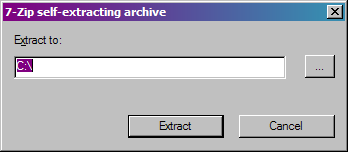
- Browse to the path entered in part 6, then the 'Firefox' subdirectory and run firefox.exe
- Enjoy your new browser
Disclaimer and Warranty
Due to the nature of the modern libraries and recent source code that this product is based on, we provide 'Fx the browser' for download as-is and without any warranty whatsoever. However all builds are tested before release and are deemed functional and stable for daily use. We have released builds to the mozilla community successfuly for several years.
©1998-2006 Contributors. Firefox and the Firefox logos are trademarks of the Mozilla Corporation. All rights Reserved.
Contact Information
Administration, Errors and Ommissions from this article, difficulties with browsing and downloads, technical Support
Feature requests, issues with builds, technical support
How to obtain Fx the browser
Choose between builds based on Firefox 3, Firefox 2 for Windows or Camino for Mac OS X. Please note older versions such as Firefox 2 are proved for historical purposes and legacy testing and we no longer release builds based on these now superseded web browsers.
Our Current builds as of March 2009: Firefox 2 | 2.0.0.10, Firefox 3 | 3.0.7 Minefield, Camino | 1.61pre